pngquant is a command-line utility and a library for lossy compression of PNG images.
The conversion reduces file sizes significantly (often as much as 70%) and preserves full alpha transparency. Generated images are compatible with all web browsers and operating systems.
 |
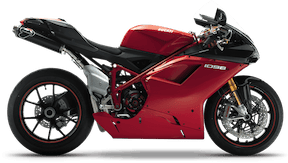 |
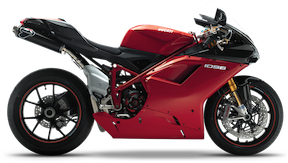
| Original PNG: 75,628 bytes | pngquant: 19,996 bytes (73% smaller) |
The latest stable version of pngquant CLI is 3.0.3 (old C releases, Rust crate). The latest stable version of libimagequant is 4.x and the Rust library is released directly to crates.io (changelog, feed).
pngquant and other toolspngquant.brew install pngquant too.The latest version is written in Rust. There is also a previous version written in C99. Both are available under the GPL or a commercial license. The project is hosted on GitHub.
git clone --recursive https://github.com/kornelski/pngquant.gitpngquant 256 *.png (recursive processing)
… | pngquant 16 | …
To further reduce file size use oxipng or ImageOptim.
See pngquant -h for full list of options.
--ext new.pngSet custom extension for output filename. By default -or8.png or -fs8.png is used.
--quality min-max
Instructs pngquant to use the least amount of colors required to meet or exceed the max quality. If conversion results in quality below the min quality the image won't be saved (if outputting to stdout, 24-bit original will be output) and pngquant will exit with status code 99.
pngquant --quality=65-80 image.png--speed N, -sNSpeed/quality trade-off from 1 (brute-force) to 10 (fastest). The default is 3. Speed 10 has 5% lower quality, but is 8 times faster than the default.
--versionPrint version information to stdout.
-Read image from stdin and send result to stdout.
--Stops processing of arguments. This allows use of file names that start with -. If you're using pngquant in a script, it's advisable to put this before file names:
pngquant $OPTIONS -- "$FILE"pngquant uses modified version of Median Cut quantization algorithm and additional techniques to mitigate deficiencies of Median Cut.
Instead of splitting boxes with largest volume or number of colors, boxes are selected to minimize variance from their median value.
Histogram is built with addition of a basic perception model, which gives less weight to noisy areas of the image.
To improve color further, histogram is adjusted in a process similar to gradient descent (Median Cut is repeated many times with more weight on poorly represented colors).
Finally, colors are corrected using Voronoi iteration (K-means), which guarantees locally optimal palette.
pngquant works in premultiplied alpha color space to give less weight to transparent colors.
When remapping, error diffusion is applied only to areas where several neighboring pixels quantize to the same value, and which are not edges. This avoids adding noise to areas which have high visual quality without dithering.
libimagequant — embeddable quantization library that powers pngquant